
 Accesories
 News
News PES 2021
 PES 2019


 Premier League
 Arsenal
 Aston Villa
 Chelsea
 Man City
 Man United
 Tottenham
 Serie A
 Inter Milan
 Juventus
 AC Milan
 Napoli
 AS Roma
 Bundesliga
 Bayer Leverkusen
 Bayern Munich
 Dortmund
 RB Leipzig
 La Liga
 Athletic Bilbao
 Barcelona
 Girona
 Real Madrid
 Ligue 1
 Lyon
Lyon Marseille
 PSG
PSG Toulouse
 Eredivisie
 Ajax
Ajax Feyenoord
 PSV
PSV FC Utrecht
 MLS
MLS Brasileiro Série A

New York New Jersey Stadium (MetLife Stadium)—FIFA World Cup 2026 Edition made for eFootball Pro Evolution Soccer 2021 & SP Football Life PC Games by Papijonnnn.
Key Features
Authentic Scale and Dimensions, Extensively Rebuilt for PES 2021
While this project began with the original Madden NFL 23 stadium model, nearly every part of the venue has been revisited throughout development. Geometry has been corrected, stadium proportions refined, missing structural details recreated, and countless assets replaced or improved to meet the quality expected from a native PES 2021 stadium. This is far more than a simple conversion—it is a complete redevelopment built upon an accurate real-world foundation.
Real-World Size & FIFA World Cup Configuration
One of the primary goals of this project was preserving MetLife Stadium's true dimensions. Unlike many recreations that enlarge the entire stadium simply to accommodate a football pitch, this version maintains the venue's authentic scale. The lower corner seating has been modified exactly as it is for FIFA events, allowing the regulation pitch to fit naturally while preserving the stadium's real-life proportions and overall appearance.
Complete PES Material & Texture Overhaul
Virtually every visible surface has been rebuilt using PES-compatible materials and workflows. Stadium structures, railings, VIP areas, balconies, stairs, walls, floors, tunnels, glass, alpha textures, and numerous architectural elements have all received new materials and extensive texture work to deliver consistent lighting, realistic reflections, and improved visual fidelity throughout the venue.
Broadcast & Matchday Accuracy
The stadium has undergone a complete presentation pass to accurately recreate the atmosphere of a modern FIFA World Cup venue. Camera placements, broadcast infrastructure, benches, technical areas, television equipment, LED systems, stadium speakers, advertising locations, staff positioning, crowd barriers, security areas, and various operational details have all been refined using real-life references to closely match current matchday broadcasts.
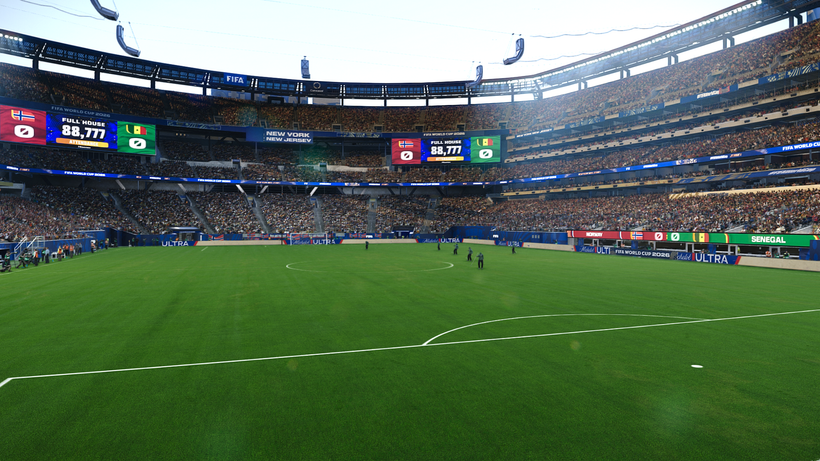
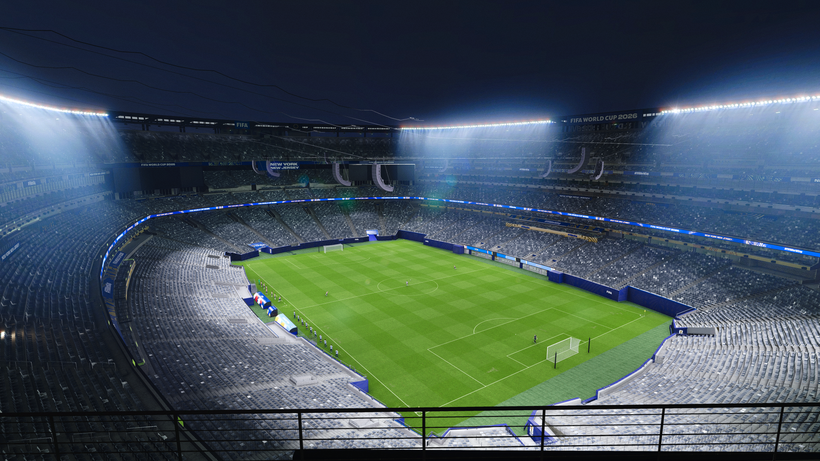
Advanced Lighting & Visual Effects (ft. Dragovic)
Special attention has been given to both daytime and nighttime presentations through an extensive lighting overhaul, including:
- Enhanced stadium glow and halo effects
- Correct Sun position based on TimeOfDaySettings in the light file (4pm kickoff will have correct shadows, as well as 3pm, 2pm, 5pm, 6pm, 8pm, etc.)
- Improved lighting meshes and light rotation
- Refined VIP room illumination
- Optimized night match atmosphere
- Improved stadium ambience during cutscenes and gameplay
The result is a significantly more immersive presentation that closely reflects modern World Cup broadcasts.
Hundreds of Stadium-Specific Improvements
Beyond the major visual upgrades, New York New Jersey Stadium (MetLife Stadium) includes hundreds of smaller refinements across nearly every aspect of the venue. Many of these changes may go unnoticed individually, but together they dramatically improve authenticity and overall quality.
Additional Features
- Complete World Cup tunnel recreation
- Stadium-Specific World Cup Adboards (made by @Arl)
- Redesigned player benches
- Rebuilt front entrance stairs
- Correct MetLife balcony structures
- Detailed VIP rooms
- Detailed Interior VIP room
- KONAMI-style glass materials (thanks to LK Mods! Check him out!)
- New railings throughout the stadium
- Stadium speakers hanging from roof as seen in real life
- Stadium halo lighting (thanks to @FletchAJX)
- CHEER banner integration
- Fixed lineup camera positioning
- Goal nets with attached support poles
- Rain and snow support
- Refined collision (.geom) geometry
- Accurate Staff and scarecrow placement
- TV enhancements with team names and colors as in real life (with help from Serge)
- Realistic Exterior and aerial environment
- Countless mesh, material, texture, and gameplay refinements across the entire venue
How to Install
Requirements
You MUST have the newest stadium-server v1.80 update that supports AddOn and .geom and multi-ID capabilities. This includes the new multi-ID feature for a variety of features (in this case for ads and TV features) and the ability to add rebound hitboxes to adboards so that the ball does not go through adboards anymore.
Installing the PES 2021 MetLife Stadium mod is easy, and it only takes a few minutes. First, you'll need to download the stadium from the link below. Once you have the mod file, you'll need to extract it to your Stadium-Server folder ... sider\content \stadium-server
Open map_teams.txt with a text editor and copy this line inside map_teams.txt
39, 016, MetLife Stadium, MetLife Stadium # USA NT
FOR MANUAL SELECTION:
Go to map_competitions.txt in your Stadium-Server folder, then insert the following line:
0, 016, MetLife Stadium, MetLife Stadium, , ,Extract and copy the "MetLife Stadium" folder inside the Stadium-Server folder ...sider/content/stadium-server
Once you are in-game, you can select the stadium via manual selection by pressing number 9 and navigating to the stadium.
Credits:
PES 2021 Prince Moulay Abdellah Stadium made by © papijonnnn, 2026
lkmods pitch and LUTs
Dragovic Helios Lighting
FletchAJX Halo Lighting effect & screenshots
the_pelado Some FIFA World Cup textures
bluestillidie00 Several Tips, help and tools
Arl Video Ads and adboards
Serge Help with TV brightness and some alpha settings
G. Leroy (pesmodding.com) / blog writer.


